

I spent a whole month trying to write the “perfect” single blog on Spark Structured Streaming Real-Time Mode… and then I accepted reality: it’s too much to cram into one post without turning it into a textbook. So this is a series.
In this first post, I’m not building a crypto demo. I’m building a pattern you can reuse for things that actually move the needle: fraud detection, IoT sensor monitoring, real-time offers, security signals—anything where you need to respond to events ASAP.
The goal is simple:
When an event looks suspicious or invalid, flag it immediately and route it differently.
That “suspicious or invalid” could be:
Fraud detection: a transaction looks off → trigger a downstream
IoT: a sensor reading is impossible → trigger an action
Security: payload contains secrets/PII patterns → quarantine in real time
Offers/personalization: Respond to specific events
For the dataset, I’m using Ethereum blocks because they’re high volume and behave like real production traffic. But the point isn’t crypto. The point is the operational pattern: real-time guardrails.
Concretely, I’m doing two checks on every block event:
Payload hygiene: flag suspicious strings in
extra_data(think accidental secrets/PII-style patterns)Data quality:
gas_used > gas_limit(This should not happen—if it does, something is wrong)
If any check trips, the event gets tagged QUARANTINE. Otherwise ALLOW. The output is just an enriched Kafka event that downstream consumers can act on immediately.
Also, I used Redpanda to run Kafka because they make it ridiculously easy to spin up a cluster, and new signups get $100 in credits for 14 days. Not sponsored.
Redpanda, if you’re reading this: give me more credits. I have too many experiments.
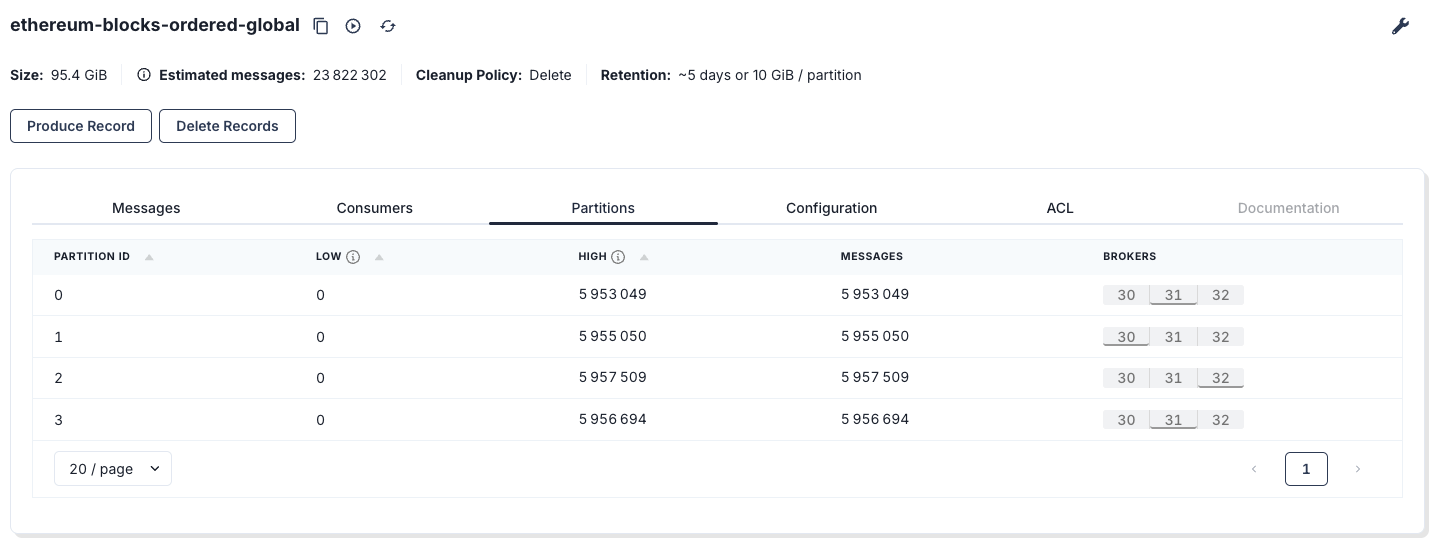
If you know me, you know I always test things at scale; if it does not scale, then I don’t write about it. I uploaded the full Ethereum chain into Kafka—about 95 GB into 4 partitions—roughly 23 million messages. If you want my notebook that dumps data into Redpanda, drop a comment and I’ll share it.
Why am I doing this?
Because I’m tired of hearing:
“Spark isn’t fast enough like Flink, so we need a whole new stack for this one use case.”
After 10+ years in data engineering, one lesson keeps paying rent: maintainability beats shiny tools more often than people want to admit. Even if the new tool is 20% faster and I have the energy to learn it, that does not automatically mean my whole team should learn it too.
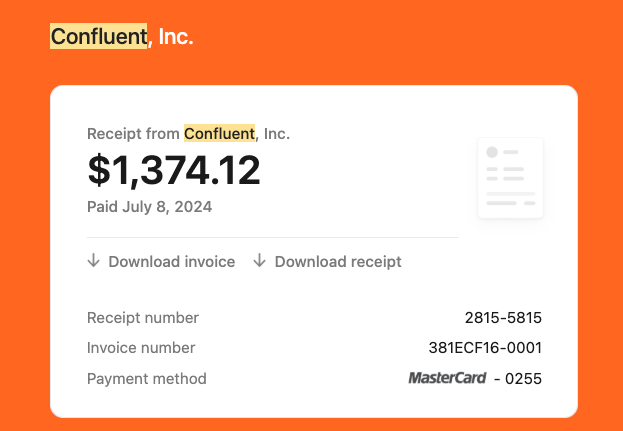
I’ve benchmarked Spark streaming enough to be confident about this: if you can tolerate ~1–2 seconds, Spark micro-batch will happily land data into Delta all day. I should redo that benchmark—last time it cost me $1,300 (Confluent waived it, bless them). I’m here for sub-second latency, not sub-second “your card has been charged” notifications.
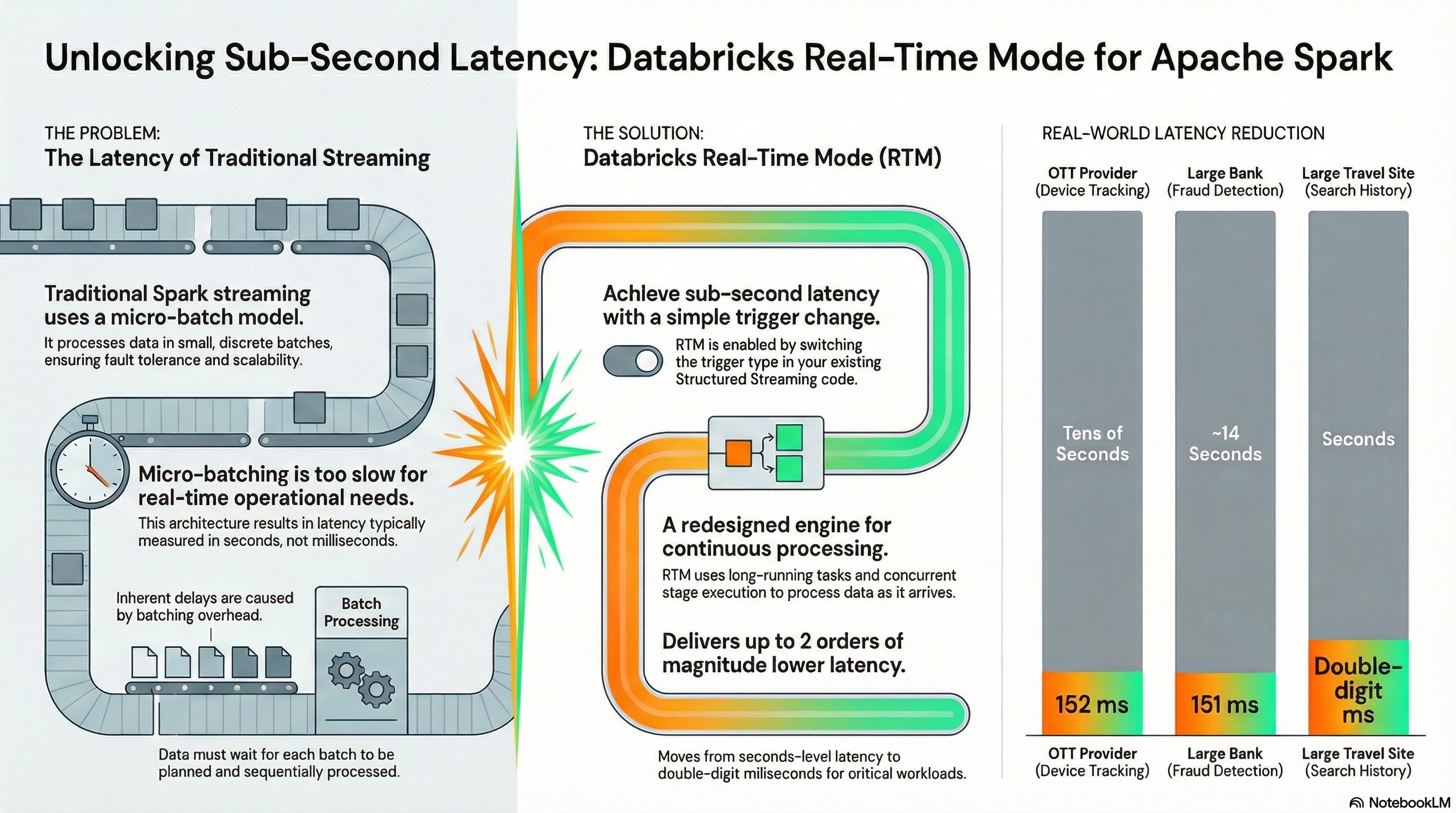
Now Spark is stepping into the sub-second territory with Real-Time Mode—a new trigger type designed for operational workloads that need immediate response, with end-to-end latency advertised as low as 5 ms (Public Preview, DBR 16.4 LTS+). Databricks Documentation
I don’t buy marketing. So I tested it.
What we’re building: Operational Guardrail Stream
Every incoming event gets evaluated immediately and we emit an enriched event downstream with:
a decision:
ALLOWvsQUARANTINEreasons: why we flagged it (data quality, payload hygiene, etc.)
This is the operational pattern that shows up everywhere:
“Do I quarantine it?”
“Do I enrich it so downstream can react instantly?”
In my dataset, the “event” is an Ethereum block. In your world, it could be a transaction, sensor reading, auth log, API call—same idea.
The dataset and assumptions
Source topic: ethereum-blocks-ordered-global
Target topic: topic-with-4-partitions
Assumptions:
Kafka
valueis JSONWe parse it into a hardcoded schema so we have typed columns like
gas_used,gas_limit,timestamp, etc.We also keep
kafka_ts(Kafka append timestamp) because for operational monitoring, arrival time matters.
What makes an event “bad” in this post
I’m keeping the rules intentionally simple and high-signal:
Rule 1: Payload hygiene check
Scan extra_data for obvious “this shouldn’t be here” patterns.
In the blog code, I show basic examples (email/JWT/AWS key shapes). Replace these with your real rules (PII patterns, internal IDs, API keys, etc.).
The point isn’t regex perfection. The point is: real-time guardrails belong in the pipeline, not in a postmortem.
Rule 2: Bad data check
gas_used > gas_limit
This should not happen. If it happens, either:
the data is corrupted,
the producer is wrong,
you’re parsing incorrectly,
or something upstream is broken.
Operationally, that’s exactly what we want: flag it immediately.
Real-Time Mode: the tiny bit you need to know
Real-Time Mode is enabled by using the real-time trigger and runs under update mode. In PySpark you specify an interval like "5 minutes".
Two important “don’t skip this” notes:
Cluster config matters (Databricks documents the required job cluster settings and the RTM enablement flag).
Output mode must be
updatewith RTM triggers.
That’s all I’m going to say here, because this post is about the operational pattern. I’ll do a deeper “RTM setup checklist” in the next post.
The code: Real-time guardrail (Kafka → Spark RTM → Kafka)
This is a single-pass pipeline:
Connect to Kafka
Parse kafka input
Compute
decision,reasonswrite JSON back to Kafka as strings (no binary needed)
Imports & Configuration
import json
import re
import uuid
from pyspark.sql import functions as F
from pyspark.sql.types import (
    StructType, StructField, StringType, LongType,
    DoubleType, TimestampType, DateType
)

# -------------------------------------------------------------------------
# 1. CONFIGURATION
# -------------------------------------------------------------------------

# --- Kafka Connection Details ---
# Ideally, fetch these from secrets (e.g., dbutils.secrets.get)
BOOTSTRAP_SERVERS = "d5deqhbrcoacstishppg.any.us-west-2.mpx.prd.cloud.redpanda.com:9092"
SASL_MECHANISM = "SCRAM-SHA-256"
RP_USERNAME = "redpanda"
RP_PASSWORD = ""

# --- Kafka Options ---
RP_KAFKA_OPTIONS = {
    "kafka.bootstrap.servers": BOOTSTRAP_SERVERS,
    "kafka.security.protocol": "SASL_SSL",
    "kafka.sasl.mechanism": SASL_MECHANISM,
    "kafka.sasl.jaas.config": (
        'kafkashaded.org.apache.kafka.common.security.scram.ScramLoginModule required '
        f'username="{RP_USERNAME}" password="{RP_PASSWORD}";'
    ),
    "kafka.ssl.endpoint.identification.algorithm": "https",
}

# --- Job Settings ---
INPUT_TOPIC = "ethereum-blocks-ordered-global"
OUTPUT_TOPIC = "topic-with-4-partitions"
CHECKPOINT_LOCATION = f"/tmp/chk_rtm_stateless_guardrail_{uuid.uuid4()}"

# Set shuffle partitions for purposes (default 200 which is too high in low latency use cases)
spark.conf.set("spark.sql.shuffle.partitions", "8")
Connect to Kafka
# --- Step A: Read from Kafka ---
df_raw = (
    spark.readStream
    .format("kafka")
    .options(**RP_KAFKA_OPTIONS)
    .option("subscribe", INPUT_TOPIC)
    .option("startingOffsets", "earliest")
    .option("failOnDataLoss", "false")
    .load()
)

#display(df_raw)
Special note: display() It is a special function that initiates the streaming query for you, allowing you to preview the live output. It kicks off the stream so you can see rows flowing without wiring up a full sink. You don’t even need to specify a checkpoint just to preview results. It’s perfect for quick debugging—just don’t confuse it with a production pipeline.
Parse JSON Payload
# -------------------------------------------------------------------------
# 2. SCHEMA DEFINITION
# -------------------------------------------------------------------------

block_schema = StructType([
    StructField("hash", StringType(), True),
    StructField("miner", StringType(), True),
    StructField("nonce", StringType(), True),
    StructField("number", LongType(), True),
    StructField("size", LongType(), True),
    StructField("timestamp", TimestampType(), True),
    StructField("total_difficulty", DoubleType(), True),
    StructField("base_fee_per_gas", LongType(), True),
    StructField("gas_limit", LongType(), True),
    StructField("gas_used", LongType(), True),
    StructField("extra_data", StringType(), True),
    StructField("logs_bloom", StringType(), True),
    StructField("parent_hash", StringType(), True),
    StructField("state_root", StringType(), True),
    StructField("receipts_root", StringType(), True),
    StructField("transactions_root", StringType(), True),
    StructField("sha3_uncles", StringType(), True),
    StructField("transaction_count", LongType(), True),
    StructField("date", DateType(), True),
    StructField("last_modified", TimestampType(), True),
])

# --- Step B: Parse JSON Payload ---
# We cast the binary 'value' to string, parse it, and flatten the struct
df_parsed = (
    df_raw
    .select(
        F.col("timestamp").alias("kafka_ts"),
        F.col("key").cast("string").alias("kafka_key"),
        F.col("value").cast("string").alias("value_str")
    )
    .withColumn("parsed", F.from_json(F.col("value_str"), block_schema))
    .where(F.col("parsed").isNotNull())  # Filter out malformed JSON
    .select(
        "kafka_ts",
        "kafka_key",
        F.col("parsed.*")
    )
)
Compute decision, reasons/ Your Custom Logic / Rules
# -------------------------------------------------------------------------
# 3. UDF DEFINITIONS
# -------------------------------------------------------------------------

# Pre-compile regex patterns for efficiency
EMAIL_RE = re.compile(r"[A-Z0-9._%+-]+@[A-Z0-9.-]+\.[A-Z]{2,}", re.IGNORECASE)
JWT_RE   = re.compile(r"eyJ[A-Za-z0-9_-]+\.[A-Za-z0-9_-]+\.[A-Za-z0-9_-]+")
AWS_RE   = re.compile(r"AKIA[0-9A-Z]{16}")

@F.udf("string")
def extra_data_reason_udf(extra_data: str) -> str:
    """
    Scans 'extra_data' field for sensitive or suspicious patterns.
    Returns a reason code if a match is found, otherwise None.
    """
    if extra_data is None:
        return None
    if EMAIL_RE.search(extra_data):
        return "EXTRA_DATA_EMAIL"
    if JWT_RE.search(extra_data):
        return "EXTRA_DATA_JWT"
    if AWS_RE.search(extra_data):
        return "EXTRA_DATA_AWS_KEY"
    return None


# --- Step C: Enrich & Apply Business Rules ---

# Rule 1: Gas Used cannot exceed Gas Limit
condition_bad_gas = (
    F.col("gas_used").isNotNull() &
    F.col("gas_limit").isNotNull() &
    (F.col("gas_used") > F.col("gas_limit"))
)

# Rule 2: Check for suspicious patterns in extra_data
col_extra_reason = extra_data_reason_udf(F.col("extra_data"))

df_enriched = (
    df_parsed
    .withColumn("bad_gas", condition_bad_gas)
    .withColumn("extra_reason", col_extra_reason)
    # Collect all failure reasons into an array
    .withColumn(
        "reasons",
        F.expr("""
            filter(
                array(
                    case when bad_gas then 'BAD_GAS_USED_GT_LIMIT' end,
                    extra_reason
                ),
                x -> x is not null
            )
        """)
    )
    # Determine final decision: Quarantine if any reasons exist
    .withColumn("is_quarantined", F.size(F.col("reasons")) > 0)
    .withColumn(
        "decision",
        F.when(F.col("is_quarantined"), F.lit("QUARANTINE"))
         .otherwise(F.lit("ALLOW"))
    )
    # Prepare final output structure for Kafka (Key, Value JSON)
    .select(
        F.col("kafka_key").cast("binary").alias("key"),
        F.to_json(F.struct(
            F.col("kafka_ts"),
            F.col("number"),
            F.col("hash"),
            F.col("miner"),
            F.col("timestamp").alias("block_ts"),
            F.col("gas_used"),
            F.col("gas_limit"),
            F.col("decision"),
            F.col("is_quarantined"),
            F.col("reasons"),
            F.col("extra_data")
        )).alias("value")
    )
)
Write Back To Kafka
# --- Step D: Write to Kafka (Real-Time Mode) ---
# The key highlight here is trigger(realTime="...")
query = (
    df_enriched.writeStream
    .format("kafka")
    .options(**RP_KAFKA_OPTIONS)
    .option("topic", OUTPUT_TOPIC)
    .option("checkpointLocation", CHECKPOINT_LOCATION)
    .option("queryName", f"rtm-stateless-guardrail-{OUTPUT_TOPIC}")
    .outputMode("update")
    # -----------------------------------------------------------------
    # REAL TIME MODE: Asynchronous checkpointing for lower latency
    # -----------------------------------------------------------------
    .trigger(realTime="1 minutes")
    .start()
)
The Best Part? It’s Just the Flip of a Switch
Perhaps the most surprising aspect of Real-Time Mode is its remarkable ease of adoption for developers already familiar with Structured Streaming. Enabling this powerful new capability does not require a complex migration or a rewrite of existing code.
Instead, users can unlock millisecond-level latency by simply changing the trigger configuration in their existing query.
This seamless user experience is a critical feature. It means teams can prototype and productionize operational workloads without the massive overhead of learning, deploying, and managing an entirely separate technology stack. This drastically accelerates innovation and reduces the risk associated with adopting new real-time use cases.
References
Real-Time Mode Technical Deep Dive: How We Built Sub-300 Millisecond Streaming Into Apache Spark™
Delivering Sub-Second Latency for Operational Workloads on Databricks


